Even though the Source Citation is exactly the same for each
person, Ancestry created a separate source citation for each person and then
links that one citation to all the facts for that person. I want only one
Source Citation for the entire source linked to the many facts.

In the above example, you see four source citations with the same detail and no citation text. In the lower portion you see the third source citation is tied to one person and four of her facts. I started this process with nine source citations and I want to end up with one source citation that is linked to many facts for multiple people.
Therefore I right click on the first source citation (top
portion) and then select Replace Source Citation which then brings up my list
of all my individual source citations. I scroll down the list until I find the
four I saw above and select one. Please note: FTM will not let you select the
one you selected in the previous step, so there is no worry of trying to figure
out which one you started with. If you try to select the one you started with,
the Ok button will remain grayed out.
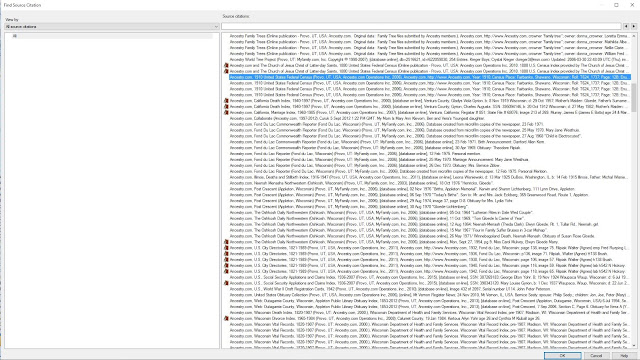
After selecting OK, it will prompt if I want to replace “one citation” with “the other citation”. After confirming that it is exactly the same citation I select YES.

After selecting OK, it will prompt if I want to replace “one citation” with “the other citation”. After confirming that it is exactly the same citation I select YES.

I will end up with the following; one source citation for all these facts. The reason behind all this effort is that I want to attach the census image to the source citation and now I only have to attach it once. Yes I could have attached it once to the first source citation of nine I started with and then linked that image to the remaining eight source citations. However, since this is one source, the census record, I want only one source citation tied to all the facts I pulled from that one source.

Keep in mind; this is just my way of doing this. If you have Family Tree Maker, I would suggest you check out Russ Worthington's Family Tree Maker User blog at http://ftmuser.blogspot.com/. Russ has many examples of how he deals with his sources and citations plus other features of Family Tree Maker.
I have a
lot more source citations to clean up and my final step will examine them and
verify if they are in Evidence Explained format. If they are not, I will only
have one source citation to deal with, instead of the nine that I started with.

